
5. FinOps: Turning Cost Management into a Business Discipline
FinOps = Cloud Finance + Operations – a cultural, technical, and financial practice that aligns engineering decisions with business outcomes.
5.1 Core Tenets
Tenet and Action
Visibility : Centralize cost data, create shared dashboards, and make spend visible to all stakeholders.
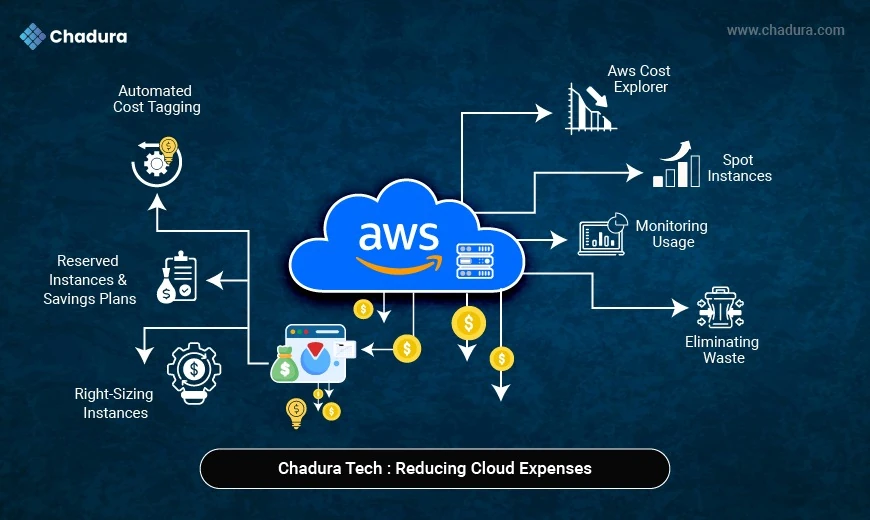
Optimization : Continuously right‑size, leverage discount programs, and remove waste.
Governance : Establish policies, budgets, and chargebacks; enforce via automation.
Collaboration : Bring together finance, engineering, and product teams to discuss trade‑offs.
5.2 Implementing a FinOps Loop
1. Collect – Pull data from Cost Explorer, CloudWatch, and tagging.
2. Analyze – Identify anomalies, forecast spend, and measure utilization.
3. Act – Execute right‑sizing, buy RIs/Savings Plans, or refactor workloads.
4. Measure – Quantify cost saved vs. baseline; update dashboards.
5. Iterate – Re‑run the loop weekly/bi‑weekly.
5.3 Chargeback vs. Showback
- Chargeback – Departments receive actual invoices proportional to usage (encourages accountability).
- Showback – Internal reporting only; useful for early stages to avoid “bill shock”.
Both require accurate tagging and allocation rules—the backbone of any FinOps practice.
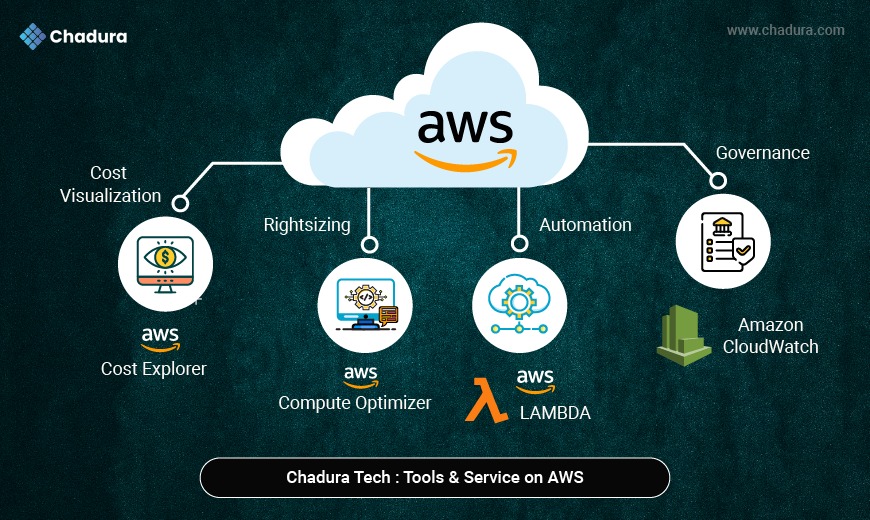
- Cost Visualization: AWS tools like Cost Explorer, Budgets, and CUR help track spending; third-party tools like CloudHealth, Cloudability, and Spot.io offer deeper insights.
- Rightsizing: AWS Compute Optimizer and Trusted Advisor suggest resource optimization; tools like ParkMyCloud and Harness enhance automation and savings.
- Automation: AWS Lambda, Systems Manager, and Instance Scheduler automate operations; Terraform and Pulumi provide infrastructure as code.
- Governance: AWS SCP and IAM Access Analyzer enforce policies; Evidently and CloudGuard strengthen compliance and control.
- Monitoring: AWS CloudWatch and Contributor Insights track performance; Datadog, New Relic, and Splunk provide advanced monitoring and analytics.
Quick Start Kit (AWS‑only, no extra spend):
- Enable Cost and Usage Report → S3 bucket.
- Turn on Compute Optimizer.
- Set up Budget alerts (e.g., 80 % of monthly forecast).
- Deploy AWS Instance Scheduler from the Solutions Library.
6. Real‑World Success Stories
6.1 Retail Giant – 35 % Reduction in Q4 Spend
- Problem: Seasonal traffic spikes caused massive over‑provisioned EC2 fleets.
- Actions:
- Implemented Auto Scaling with predictive scaling based on CloudWatch metrics.
- Moved batch image‑processing jobs to Spot Fleet with a 2‑minute checkpoint.
- Purchased Savings Plans for baseline traffic.
- Result: $3.2 M saved in a single quarter, while maintaining 99.99 % availability.
6.2 FinTech Startup – 60 % Cut in Data Storage Costs
- Problem: Logs and audit trails stored in S3 Standard for 3 years.
- Actions:
- Applied Intelligent‑Tiering and Lifecycle policies moving data to Glacier after 90 days.
- Compressed logs before upload using gzip.
- De‑duplicated with S3 Object Lock versioning.
- Result: Storage bill fell from $250k/yr to $100k/yr, freeing capital for product R&D.
6.3 Global SaaS Provider – 45 % Savings on Compute
- Problem: Monolithic application on m5.large instances ran at 15 % CPU for most of the day.
- Actions:
- Refactored core services into Fargate containers, leveraging CPU burst for spikes.
- Applied Compute Optimizer recommendations to switch to t4g.medium (Graviton2) – 30 % cheaper per vCPU.
- Bought Convertible RIs for the new instance type, covering 70 % of baseline usage.
- Result: $1.1 M annual savings, with a 15 % performance uplift due to ARM architecture.
7. A 30‑Day Actionable Checklist
Days 1–3 – Enable Visibility
Turn on Cost and Usage Report (CUR), configure S3 bucket, and integrate with Athena so you have queryable cost data.
Days 4–6 – Tagging Enforcement
Deploy a tag-validation Lambda via CloudTrail to block creation of untagged resources—no tags, no resource.
Days 7–10 – Baseline Assessment
Run Compute Optimizer and Trusted Advisor; export a “Current Utilization” report to establish your baseline.
Days 11–13 – Right-Size Pilot
Identify top 5 costliest EC2 instances; resize or migrate to Graviton2; monitor performance for 48 hours.
Days 14–16 – Spot-ify Batch Jobs
Move a non-critical ETL workload to Spot Fleet; implement S3 checkpointing to avoid job loss.
Days 17–19 – Savings Plans Purchase
Analyze CUR forecast; commit ~30% of projected compute spend to a Compute Savings Plan.
Days 20–22 – Storage Tier Review
Find S3 buckets over 30 TB; apply Intelligent-Tiering or lifecycle policies to Glacier.
Days 23–24 – Dev/Test Scheduler
Deploy Instance Scheduler to stop non-production instances at 7 PM UTC; validate no active usage.
Days 25–27 – Cross-Account Alignment
Consolidate accounts under AWS Organizations; enable RI sharing across accounts.
Days 28–30 – FinOps Review & Reporting
Create a QuickSight dashboard showing cost per CostCenter; share with finance and engineering.
Ongoing (Weekly) – Continuous Optimization
Review budget alerts, adjust scaling policies, and revisit right-sizing recommendations regularly.
Tip: Document every change in a Change Log (Git repository recommended). This creates an audit trail and makes rollback painless.
8. Final Thoughts
AWS offers an unprecedented toolbox for scaling, innovating, and delivering value at speed. Yet, without a disciplined cost‑optimization strategy, that power can quickly become an expense drain. The roadmap outlined above—rooted in visibility, right‑sizing, commitment discounts, spot utilization, serverless adoption, and FinOps governance—gives you a proven pathway to achieve double‑digit savings while preserving (or even improving) performance and reliability.
Remember:
- Start small, with a pilot that proves ROI, then scale the practice organization‑wide.
- Make cost a first‑class metric on every architectural decision board.
- Automate the “turn off the lights” actions—you’ll be surprised how many idle resources hide in plain sight.
- Iterate constantly; the AWS pricing landscape evolves (new instance families, new Savings Plan options), and your optimization program must evolve with it.