

Moving your operations to the cloud promises unparalleled scalability and powerful infrastructure. Google Cloud Platform offers access to advanced machine learning services, robust compute engines, and massive storage capabilities. Yet, many organizations quickly discover a frustrating reality when their monthly invoice arrives. Instead of the lean, efficient billing they anticipated, they face unexpected charges that completely derail their IT budgets.
The core issue stems from the consumption-based pricing model. Cloud providers charge for what you provision, not necessarily what you actively use. If your engineering team spins up resources for a temporary project and forgets to tear them down, the meter keeps running. Chadura Tech, a leading provider of cloud solutions and financial management tools, has audited numerous startup and enterprise environments. They discovered a staggering statistic: most organizations use only 60% of their provisioned cloud resources.
Leaving 40% of your cloud budget on the table limits your ability to invest in new features, hire top talent, or expand your market reach. Identifying the specific sources of these billing leaks requires a deep understanding of cloud architecture. Fortunately, you do not have to navigate this complex billing landscape alone.
This comprehensive guide explores the most common hidden costs lurking within your Google Cloud environment. By applying Chadura Tech’s proven optimization blueprint, you will learn how to identify financial leaks, implement smart automation, and regain total control over your cloud spending.
The Most Common Hidden Costs in Google Cloud
Hidden costs rarely announce themselves. They accumulate quietly in the background, adding fractions of a cent per minute until they form a massive line item at the end of the month. Chadura Tech has identified several major culprits that consistently inflate Google Cloud bills.
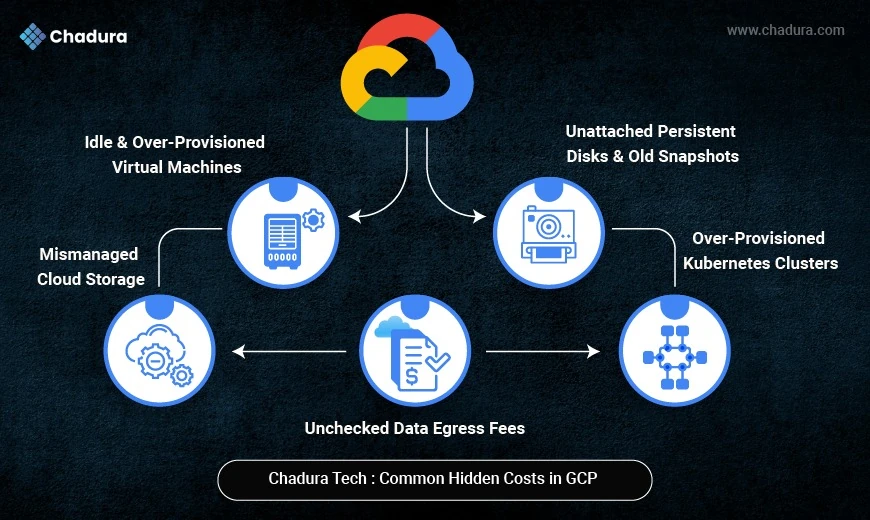
Idle and Over-Provisioned Virtual Machines
Compute Engine usage typically accounts for 50% to 70% of a company's total Google Cloud bill. The most frequent mistake engineering teams make is selecting the default instance size without analyzing the actual workload requirements. Developers often provision powerful machines just to be safe, resulting in virtual machines running at less than 30% CPU capacity and below 40% memory utilization.
Additionally, idle virtual machines remain a massive problem. A developer might spin up a robust instance to test a specific software build on a Friday afternoon. If they log off for the weekend without shutting the instance down, you pay for 48 hours of premium computing power that literally did nothing.
Unattached Persistent Disks and Old Snapshots
When you delete a virtual machine in Google Cloud, the platform does not automatically delete the attached persistent disks unless you specifically configure it to do so. Over time, these orphaned disks pile up. You continue to pay standard storage rates for gigabytes or terabytes of data that are no longer connected to any active application.
Similarly, automated backup policies often create daily snapshots of your environment. If you do not establish a rule to delete snapshots older than 30 days, your storage costs will compound infinitely as new backups are added to the pile.
Unchecked Data Egress Fees
Transferring data into Google Cloud is generally free. Moving data out of the cloud, or even between different regions within the cloud, comes with a price tag. Many organizations design applications that constantly fetch data across different geographical zones. This inter-zone traffic triggers continuous network egress fees. Data transfer costs are frequently ignored during the architectural planning phase, leading to shocking end-of-month surprises.
Over-Provisioned Kubernetes Clusters
Google Kubernetes Engine (GKE) is a phenomenal tool for orchestrating containerized applications. However, it is remarkably easy to misconfigure. Organizations often allocate excessive CPU and memory requests at the pod level. When you inflate these resource reservations, Kubernetes provisions more underlying worker nodes than necessary. You end up paying for a massive cluster to support applications that require only a fraction of that computing power.
Mismanaged Cloud Storage
Companies generate massive volumes of data every single day. This includes application logs, media assets, database backups, and analytics datasets. Google Cloud Storage is highly durable, but keeping every single file in the premium "Standard" storage class indefinitely is a massive waste of capital. A log file from two years ago does not need to sit in high-performance storage. Failing to move stale data to cheaper storage tiers is one of the most persistent billing leaks Chadura Tech encounters.
Chadura Tech’s Cost-Optimization Blueprint
Stopping these financial leaks requires a proactive, structured approach. Chadura Tech utilizes a comprehensive optimization framework that regularly reduces cloud bills by 30% to 65%. Here is how you can apply their strategies to your own environment.
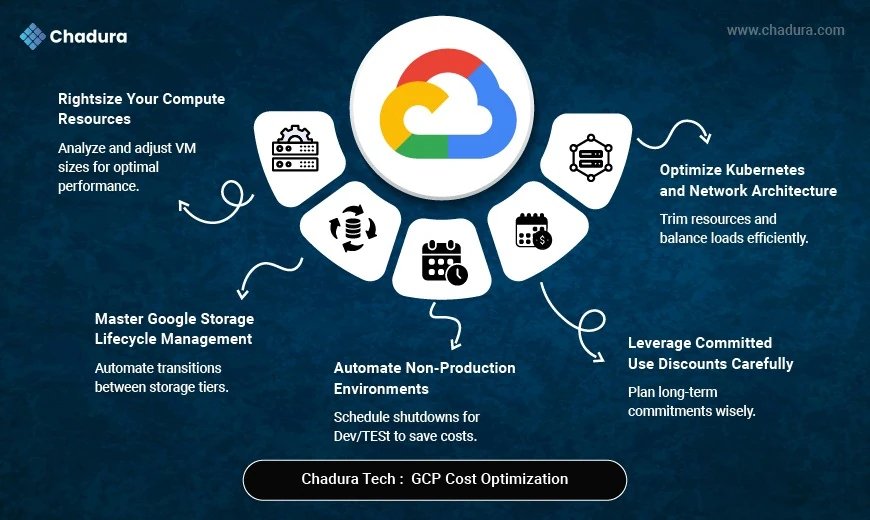
Rightsize Your Compute Resources
The fastest way to lower your cloud bill is to align your virtual machine sizes with their actual workloads. Start by reviewing Cloud Monitoring metrics to identify instances with consistently low utilization. Once identified, downgrade these over-provisioned instances to more budget-friendly tiers.
For example, Chadura Tech frequently moves clients from expensive n1 instances to cost-effective e2 instances for general workloads. If a workload is memory-intensive but light on CPU, switching to an e2-highmem instance prevents you from buying unnecessary processing power. For batch jobs or continuous integration pipelines that can handle interruptions, utilizing Spot instances offers steep discounts compared to regular pricing.
Automate Non-Production Environments
Development, testing, and QA environments do not need to run 24 hours a day, seven days a week. Your engineering team likely works standard business hours. By automating the shutdown of non-production virtual machines at night and restarting them in the morning, you instantly cut the billing for those resources by roughly 65%. Implementing weekend shutdowns pushes those savings even higher.
Master Google Cloud Storage Lifecycle Management
You can drastically reduce storage costs by implementing automated lifecycle rules. Chadura Tech recommends a tiered transition strategy for data based on how frequently it is accessed.
Set a rule to automatically move data to the Nearline storage class after 30 days. Nearline is perfect for data accessed less than once a month, like monthly reports. After 90 days, transition the data to Coldline storage, which is ideal for quarterly backups. Finally, shift data older than 180 days into Archive storage for long-term compliance retention. You should also implement automatic deletion rules for files older than a year, provided regulatory requirements permit it. Compressing log files using GZIP before uploading them to the cloud will shrink your storage footprint even further.
Optimize Kubernetes and Network Architecture
To control GKE costs, enable node autoscaling so your cluster expands and contracts based on actual traffic demands. Implement pod-level optimization by rightsizing your CPU and memory requests. For non-critical cluster tasks, utilize Spot nodes to capture significant savings.
To mitigate data egress fees, try to keep your services operating within the same zone or region. Utilize Cloud CDN to serve content to your users efficiently, which severely reduces the amount of data leaving your primary servers. Furthermore, single-region storage buckets can save you up to 40% compared to multi-region alternatives, provided your availability requirements allow for it.
Leverage Committed Use Discounts Carefully
Google Cloud rewards loyalty. If you commit to using a specific amount of resources for one to three years, you can secure Committed Use Discounts of up to 72%. However, Chadura Tech advises caution here. You should only purchase these commitments for highly predictable, stable production workloads. Applying them to dynamic or experimental environments locks you into paying for capacity you might not need six months down the line.
Take Control of Your Cloud Spend Today
Failing to manage your cloud infrastructure actively guarantees inflated invoices and wasted capital. The convenience of spinning up infinite resources at the click of a button must be balanced with strict governance and automated cost controls.
Start by conducting a thorough audit of your compute usage. Shut down idle machines, clear out orphaned disks, and establish firm lifecycle rules for your storage buckets. Consider leveraging platforms like Billcostro to bring total transparency to your software subscriptions and vendor expenses. By implementing these structured strategies, you transform your cloud environment from a financial liability into a highly efficient engine for business growth.
Conclusion
In conclusion, taking control of your cloud environment is not just about cutting costs—it's about driving innovation and improving operational efficiency. By adopting mindful governance practices, automating cost controls, and leveraging the right tools, you can ensure that every dollar spent contributes to the strategic goals of your organization. A well-managed cloud infrastructure empowers your business to scale sustainably, adapt to evolving needs, and maintain a competitive edge in today's dynamic market.