
Introduction to Systems Manager
Systems Manager is a management service that helps you automatically collect software inventory, apply operating system (OS) patches, create system images, and configure operating systems across your AWS infrastructure and on-premises infrastructure. Systems Manager provides a unified interface to view operational data from multiple Amazon Web Services (AWS) services and automates tasks across your resources.
Systems Manager reduces the need for manual operations by offering capabilities to maintain security and compliance through automation and streamlined resource management. It gives you visibility and control of your infrastructure on AWS, helps you maintain a consistent state across your environment, and provides secure access to your resources.
Systems Manager offers a comprehensive suite of tools that work together to provide complete management of your infrastructure. It combines operational insights, actions, and automation in one place, which makes it a powerful solution for bridging infrastructure management across cloud and on-premises environments. This integrated approach allows for more efficient and consistent management of resources, regardless of their location.
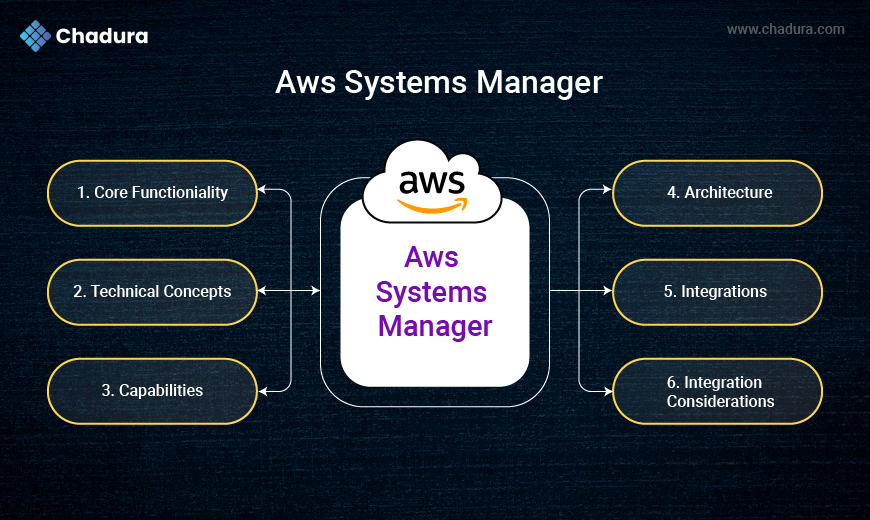
1.Systems Manager core functionality
Systems Manager provides a comprehensive set of management capabilities that work together to help you operate AWS and on-premises infrastructure efficiently and securely. These core capabilities deliver centralized control, automation, and operational visibility.
Resource groups in Systems Manager organize AWS resources into logical collections. This organization enables efficient management, monitoring, and automation of tasks on groups of resources instead of managing them individually.
Tags are key-value pairs that you assign to AWS resources, which Systems Manager uses to define resource group membership. By using tags effectively, you can create dynamic resource groups that automatically update as resources with matching tags are created or modified.
Operations management
Operations management capabilities help you gain visibility into your operations and maintain control of your environment. These tools collect and display operational data across your resources to help you identify and resolve issues quickly.
Systems Manager dashboards provide a centralized view of operational data, including resource compliance status, patch levels, and configuration changes. This visibility helps you maintain awareness of your environment's health and respond to issues before they impact your operations.
Shared resources
Shared resources in Systems Manager provide a foundation for other capabilities. These include documents that define actions, parameters that store configuration data, and maintenance windows that schedule operations.
AWS Systems Manager documents (SSM documents) defines the actions that Systems Manager performs on your managed instances. SSM documents can be used for automation, to run commands, or to create associations that maintain a consistent state across your environment.
2.Systems Manager technical concepts
AWS Systems Manager operates across several IT domains, including infrastructure management, application management, and security operations. Understanding these domains helps you implement Systems Manager effectively in your environment.
Managed instances
Managed instances are Amazon Elastic Compute Cloud (Amazon EC2) instances, on-premises servers, or virtual machines (VMs) that have the Systems Manager Agent installed and are registered with Systems Manager. These instances can receive commands and be managed through Systems Manager.
The AWS Systems Manager Agent (SSM Agent) is software installed on your instances that communicates with Systems Manager. It runs the tasks requested by Systems Manager and sends status and execution information back to the service.
IAM permissions
AWS Identity and Access Management (IAM) permissions control who can access Systems Manager and which actions they can perform. These permissions are essential for maintaining security and compliance in your environment.
Systems Manager requires specific IAM roles and policies to function properly. Instances need an instance profile that grants permission to communicate with the Systems Manager service, and users need appropriate permissions to perform management tasks.
Parameter Store
Parameter Store, a capability of AWS Systems Manager, provides secure storage for configuration data, secrets, and other operational parameters. It helps you centralize configuration management and reduce the risk of exposing sensitive information.
Parameters can be stored as plaintext or encrypted values, with encryption handled by AWS Key Management Service (AWS KMS). With this flexibility, you can store both sensitive and nonsensitive data in a single location.
Automation documents
Automation, a capability of AWS Systems Manager, uses documents that define the sequence of actions to perform on your resources. These automation documents help you standardize common maintenance and deployment tasks across your environment.
These documents use YAML or JSON format to specify the steps, inputs, and outputs of an automation workflow. You can create custom automation documents or use documents provided by AWS for common tasks.
State Manager
State Manager, a capability of AWS Systems Manager, helps you define and maintain consistent configurations for your managed instances. It helps make sure that your instances maintain their target state over time.
Associations in State Manager link a document with target instances and define when the document should run. This mechanism helps you enforce configuration policies and remediate drift automatically.
Inventory management
Inventory, a capability of AWS Systems Manager, collects metadata about your managed instances, including installed applications, network configurations, and system updates. This data helps you track changes and maintain compliance.
The inventory data is stored in AWS and can be queried using Systems Manager or exported to other services for analysis. This capability provides visibility into your environment without requiring additional monitoring tools.
The components of Systems Manager work together to provide a comprehensive management solution. By understanding these components and their associated concepts, you can effectively implement Systems Manager to help improve operational efficiency, security, and compliance across your environment.
3.Systems Manager capabilities
Systems Manager offers a comprehensive set of capabilities designed to help you manage AWS and on-premises infrastructure efficiently. They work together to provide visibility, control, and automation across your environment.
Review the following to learn more about the capabilities of Systems Manager.
Automation
Automation provides workflows for performing common maintenance and deployment tasks across AWS resources. These workflows can be triggered manually, on a schedule, or in response to events.
Automation documents define the steps in your workflow, including the actions to perform and the conditions for success or failure. You can use these documents to standardize processes, such as patching, Amazon Machine Image (AMI) creation, and incident response, which reduces manual effort and human error.
Run Command
With Run Command, a capability of AWS Systems Manager, you can remotely run commands on your managed instances without needing to log in directly. This capability is useful for administrative tasks, software installations, and configuration changes.
You can run commands on individual instances or groups of instances based on tags or resource groups. Run Command tracks command execution status and can integrate with Amazon CloudWatch Logs to provide detailed output for troubleshooting and auditing.
Patch Manager
Patch Manager, a capability of AWS Systems Manager, automates the process of patching your managed instances with security updates. It helps you maintain compliance with security policies and reduce vulnerability exposure.
Patch baselines define which patches should be applied to your instances, and patch groups organize instances for patching. Maintenance windows control when patches are applied, which minimizes disruption to your operations.
Session Manager
Session Manager, a capability of AWS Systems Manager, provides SSH access to your instances without requiring open inbound ports, bastion hosts, or SSH keys. This improves your security posture while maintaining administrative access.
All session activity can be logged to CloudWatch Logs or Amazon Simple Storage Service (Amazon S3) for auditing purposes. Session Manager supports both interactive sessions and running single commands, which gives you flexibility in how you manage your instances.
Compliance
Compliance, a capability of AWS Systems Manager, helps you scan your managed instances for patch compliance and configuration inconsistencies. These scans identify resources that deviate from your defined policies.
Compliance data is presented in dashboards that display your overall compliance status and highlight specific issues. This visibility helps you prioritize remediation efforts and maintain a secure environment.
Inventory
Inventory collects information about your managed instances, including installed applications, OS details, network configurations, and more. This data provides visibility into your environment's current state.
You can query inventory data to find instances with specific configurations or software versions. This capability helps you track software licenses, identify unauthorized applications, and plan for upgrades or migrations.
4.Systems Manager architecture
The Systems Manager architecture delivers management and automation capabilities through integrated components that handle resource control, configuration management, and operational oversight. This architecture supports continuous operations while maintaining security and performance across AWS and on-premises environments.
Understanding Systems Manager components
Systems Manager
Systems Manager acts as the central control plane that processes requests, stores configuration data, and coordinates actions across your environment. It authenticates and authorizes requests based on IAM policies.
SSM Agent
SSM Agent runs on your managed instances and communicates with Systems Manager. It receives commands, performs them locally, and reports results back to the service.
Systems Manager API
The Systems Manager API provides programmatic access to all Systems Manager capabilities. It helps you integrate Systems Manager with your existing tools and workflows.
Document and automation management
The Documents tool stores and manages AWS Systems Manager documents (SSM documents), which define actions to perform on your resources. These documents support automation workflows, maintain state management, and handle error conditions across your Systems Manager capabilities.
Resource assessment
The Inventory and Compliance tools work together to maintain visibility of your environment. Inventory collects and stores metadata about your managed instances, whereas Compliance evaluates these resources against defined policies to identify configuration requirements and security standards.
Parameter Store
Parameter Store securely stores configuration data and secrets. It integrates with AWS KMS for encryption and provides hierarchical organization of parameters.
5.Systems Manager integrations
Systems Manager integrates with numerous AWS services to extend its capabilities and provide a comprehensive management solution. These integrations allow Systems Manager to access resources, store data, and coordinate with other services in your AWS environment.
Amazon EC2
By integrating with Amazon EC2, Systems Manager manages your virtual machines in the AWS Cloud. Systems Manager can discover EC2 instances, install the SSM Agent, and perform management actions.
EC2 instances require an instance profile with appropriate IAM permissions to communicate with Systems Manager. When configured, these instances appear as managed nodes in Systems Manager and can receive commands, participate in maintenance windows, and report inventory data.
IAM Identity Center
AWS IAM Identity Center integration provides authentication and authorization for Systems Manager actions. It controls who can access Systems Manager features and what actions they can perform.
Systems Manager uses IAM Identity Center roles to access other AWS services on your behalf. For example, an automation role grants Systems Manager permission to create or modify resources during an automation workflow.
Logging and monitoring
AWS CloudTrail and Amazon CloudWatch work together to provide comprehensive operational visibility. CloudTrail records API calls for audit trails, and CloudWatch enables monitoring and alerting for Systems Manager operations.
You can create CloudWatch alarms to notify you of important events, such as failed patch operations or compliance violations. CloudTrail logs provide visibility into who performed actions and when, helping you maintain security and compliance requirements.
Data storage and security
Amazon S3 and AWS KMS provide secure data management capabilities. Amazon S3 stores Systems Manager operational data including inventory reports, patch compliance information, and session logs. AWS KMS handles encryption for sensitive information.
You can configure S3 lifecycle policies to manage data retention and reduce storage costs. AWS KMS integration helps you meet security and compliance requirements through centralized key management and encryption of sensitive data.
Lambda
AWS Lambda integration allows Systems Manager to extend functionality through custom code. Lambda functions can perform complex logic, interact with external systems, or implement custom validation beyond standard Systems Manager capabilities.
This integration provides flexibility for unique management requirements, allowing you to build custom solutions that work seamlessly with Systems Manager workflows.
6.Integration considerations
Consider the following when implementing Systems Manager integrations with other services.
Security
Use IAM Identity Center roles and policies to manage service access to Systems Manager, implement encryption for sensitive data, and follow security best practices for authentication. Regularly audit access patterns and permissions to maintain a strong security posture. Consider implementing additional security layers such as VPC endpoints or private links where applicable to minimize exposure to public networks.
Now that you have reviewed the security considerations, move on to the next tab to learn about scalability.
Scalability
Design integrations with Systems Manager to handle varying workloads by implementing proper error handling and retry mechanisms. Monitor service quotas and request increases when needed to accommodate growth. Use asynchronous processing patterns where appropriate to decouple components and improve system resilience during peak loads.
Now that you have reviewed the scalability considerations, move on to the next tab to learn about monitoring.
Monitoring
Set up comprehensive monitoring for Systems Manager using CloudWatch metrics and create appropriate alarms to detect potential issues early. Implement logging for troubleshooting and optimization, and consider setting up dashboards to visualize key performance indicators. Establish automated notification systems to alert teams when predefined thresholds are exceeded.