
In today's cloud-first environment, organizations generate and store massive volumes of data—logs, backups, analytics outputs, media files, database dumps, and more. While Google Cloud Storage (GCS) offers unmatched durability and availability, keeping all data in high-cost storage classes indefinitely can result in unnecessary spending. This is where Google Cloud Storage Life cycle Management becomes crucial.
Life cycle management is Google's automated solution to help businesses reduce storage costs, enforce data governance standards, optimize performance, and ensure that every object is stored in the most cost-efficient storage class throughout its lifecycle.
This comprehensive guide by Chadura Tech breaks down everything you need to know about GCS life cycle management—from storage class fundamentals to real-world examples, implementation steps, YAML policies, automation strategies, and enterprise best practices.
1.Understanding Google Cloud Storage
Google Cloud Storage (GCS) is a fully managed, scalable object storage service that lets you store any amount of unstructured data—such as logs, media files, backups, and analytics datasets—with high durability and global availability. It supports multiple storage classes (Standard, Nearline, Coldline, Archive) to optimize costs based on how frequently your data is accessed.
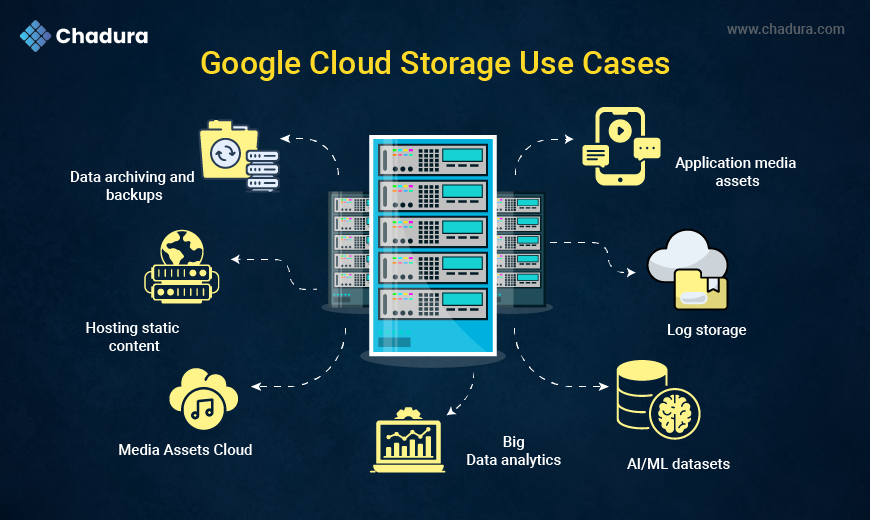
Google Cloud Storage is a scalable, global, fully managed object storage service designed for any type of unstructured data. It is used for:
- Data archiving and backups
- Application media assets
- Log storage
- AI/ML datasets
- Big Data analytics
- Disaster recovery workloads
- Hosting static content
Benefits of Google Cloud Storage
- 11 nines durability (99.999999999%)
- Globally distributed access
- Flexible storage classes for cost optimization
- Strong integrations (BigQuery, Dataproc, Dataflow, GKE, etc.)
- Powerful security and compliance controls
- Built-in lifecycle automation features
2. Why Lifecycle Management is Necessary
Managing cloud storage manually is inefficient and error-prone. Data grows daily, and not all data needs to be stored in premium storage classes. With lifecycle management:
You reduce costs
Move older, less-used data to cheaper classes like Nearline, Coldline, or Archive.
You enforce compliance
Automatically delete data after retention periods (GDPR, PCI-DSS, SOC, healthcare HIPAA policies).
You improve operational efficiency
Automate repetitive data management tasks.
You optimize performance
Keep frequently used objects in high-performance classes and move stale ones elsewhere.
You avoid human mistakes
No engineer has to manually clean up or track data aging.
3. Google Cloud Storage Classes Explained
Google Cloud Storage offers four classes—Standard, Nearline, Coldline, and Archive—designed to balance performance and cost based on how often data is accessed.
Standard is for frequently used data, while Nearline and Coldline suit infrequent access.
Archive provides the lowest-cost option for long-term data retention and compliance storage.
Before implementing lifecycle rules, you must understand the available storage classes and their use cases.
3.1 Standard Storage
- Ideal for frequently accessed data
- Use cases: hot content, mobile apps, websites, real-time analytics
3.2 Nearline Storage
- 30-day minimum storage duration
- Low-cost storage for data accessed < once a month
- Use cases: monthly logs, monthly reports, long-tail content
3.3 Coldline Storage
- 90-day minimum duration
- For infrequently accessed data (e.g., once per quarter)
- Use cases: quarterly backups, older logs, archival datasets
3.4 Archive Storage
- 365-day minimum duration
- Lowest storage cost
- Use cases: long-term retention, compliance archives, rarely accessed backups
4. What Is Lifecycle Management?
Lifecycle Management in Google Cloud Storage is an automation feature that moves or deletes objects based on defined rules.
It helps control storage costs by transitioning older data to cheaper classes or removing it when no longer needed.
This ensures efficient data governance, cost optimization, and hands-free storage management.
Key Actions
- SetStorageClass – change storage class
- Delete – remove objects permanently
- AbortIncompleteMultipartUpload – prevent unnecessary storage charges
Supported Conditions
- Age of object (in days)
- Object creation date
- Object's storage class
- Object name prefix or suffix
- Newer versions of objects
- Days since the object became noncurrent
Lifecycle rules apply at bucket level.
Supported Conditions
- Age of object (in days)
- Object creation date
- Object's storage class
- Object name prefix or suffix
- Newer versions of objects
- Days since the object became non current
Lifecycle rules apply at bucket level.
5. How Lifecycle Management Works
.webp)
Google Cloud checks lifecycle rules once a day and automatically applies actions when conditions are met.
For example, a log file can move from Standard to Nearline after 30 days, then to Coldline after 90 days, Archive after 180 days, and finally be deleted after 365 days.
This automated flow ensures data is stored cost-effectively throughout its lifecycle.
Example flow:
- New log file saved to bucket
- After 30 days → Move to Nearline
- After 90 days → Move to Coldline
- After 180 days → Move to Archive
- After 365 days → Delete permanently
6. Real-World Use Cases
Lifecycle management helps automate data transitions based on usage: logs can move to Coldline after 30 days and delete after a year; unused media can shift to Nearline or Archive; ML datasets can transition from Standard to Coldline or Archive; DevOps backups can auto-archive and delete after set periods; and enterprises can enforce retention-based deletion for compliance. This ensures cost efficiency, organization, and strong data governance.
6.1 Use Case 1: Log Archiving for Compliance
- Move logs older than 30 days to Coldline
- Retain logs for 1 year
- Auto-delete after 365 days
6.2 Use Case 2: Media Storage Optimization
- Unused media > 60 days → Nearline
- Archived media > 1 year → Archive
6.3 Use Case 3: AI/ML Dataset Management
Frequently accessed training files stay in Standard
- Old checkpoints → Coldline
- Archive unused model versions
6.4 Use Case 4: DevOps Backup Automation
- Daily backups → Archive after 90 days
- Delete after 1 year
6.5 Use Case 5: Enterprise Data Governance
- Enforce mandatory data deletion after retention periods
7. Lifecycle Rule Structure
Lifecycle configuration is defined in JSON or YAML.
Rule Structure Includes:
- Action
- Condition
Example:
{
 "rule": [

    {

      "action": { "type": "SetStorageClass", "storageClass": "NEARLINE" },

      "condition": { "age": 30 }

    }

  ]

}
8. Complete Lifecycle Flow for an Enterprise
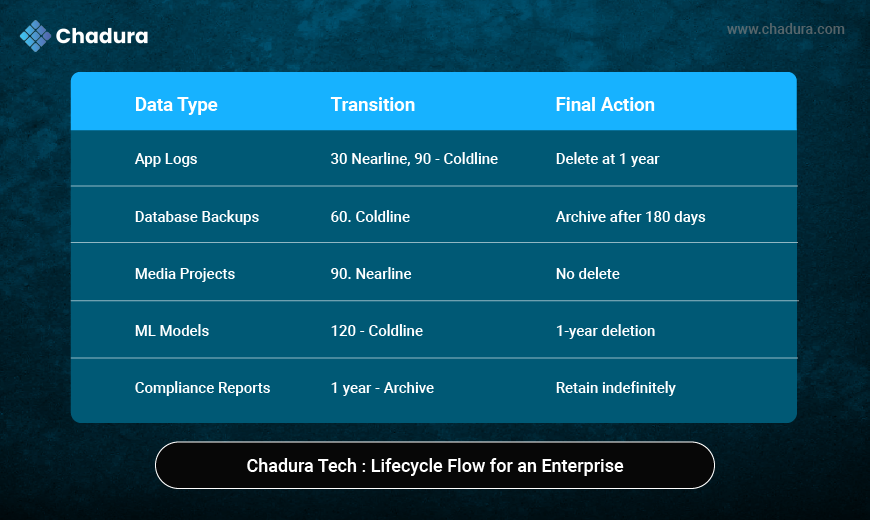
9. Detailed Actions
9.1 SetStorageClass Action
Changes an object's storage class based on age or prefix/suffix match.
9.2 Delete Action
Used to remove expired or obsolete data.
9.3 AbortIncompleteMultipartUpload
Prevents charges for incomplete uploads.
10.Creating Lifecycle Policies
Google Cloud allows lifecycle rules via:
- Google Cloud Console
- gcloud CLI
- JSON/YAML
- Terraform
- REST API
Google Cloud lets you create lifecycle policies using multiple methods, including the Console, gcloud CLI, JSON/YAML files, Terraform, and REST API.
These options provide flexibility for both manual setup and automated infrastructure management.
You can easily define actions like moving or deleting objects based on conditions to optimize storage.
11. Implementing Lifecycle Policies – Step by Step
11.1 Using Google Cloud Console
- Go to Cloud Storage → Bucket
- Select your bucket
- Go to Lifecycle tab
- Click Add Rule
- Choose:
- Action (Transition / Delete)
- Conditions (Age, Storage Class, Prefix, Suffix)
6. Save
11.2 Using gcloud CLI
Example:
gcloud storage buckets update gs://mybucket \
 --lifecycle-file=lifecycle.json
11.3 Sample lifecycle.json
Convert data > 30 days to Nearline
{
 "rule": [
    {
      "action": { "type": "SetStorageClass", "storageClass": "NEARLINE" },
      "condition": { "age": 30 }
    }
  ]
}

Delete data older than 365 days

{
  "rule": [
    {
      "action": { "type": "Delete" },
      "condition": { "age": 365 }
    }
  ]
}
12. Monitoring Lifecycle Policies
You can monitor lifecycle activity in Google Cloud using tools like Cloud Storage logs, Cloud Audit Logs, and Cloud Monitoring metrics to track rule execution.
BigQuery log sinks help analyze object transitions in detail, while Billing dashboards show cost impact and savings.
Together, these tools ensure your lifecycle rules are working correctly and efficiently
13. Tools You Can Use
- Cloud Storage logs
- Cloud Audit Logs
- Cloud Monitoring Metrics
- BigQuery log sinks for analytics
- Billing dashboards
14. Cost Optimization Strategies
14.1 Use Multi-Step Transitions
Hot → Warm → Cold → Archive
This maximizes cost savings.
14.2 Apply Prefix-Based Rules
Separate folders by project or department.
14.3 Implement Automatic Deletes
To prevent cost overruns.
14.4 Versioning + Lifecycle Rules
Auto-delete old versions to save storage.
14.5 Use Suffix to Target File Types
Example: *.log, *.backup, *.zip
15. Challenges & How to Avoid Them
15.1 Incorrect Prefix Matching
Avoid rules that accidentally delete wrong files.
15.2 Ignoring Minimum Storage Durations
This causes unexpected costs.
15.3 Immediately Archiving Frequently Accessed Data
Leads to higher retrieval fees.
15.4 Too Many Rules
Keep lifecycle configuration simple and predictable.
Conclusion
Google Cloud Storage Lifecycle Management is one of the most powerful automation tools for reducing storage costs, enforcing compliance, and maintaining data hygiene. Whether you are storing application logs, ML datasets, media files, or backups, lifecycle rules ensure your data moves seamlessly through the right storage classes and is deleted when no longer needed.
By implementing proper lifecycle strategies, organizations—especially those scaling globally—can save 50% to 90% on storage costs while maintaining full performance and reliability.
At Chadura Tech, we strongly recommend incorporating lifecycle policies into every cloud storage architecture to build smarter, cost-efficient, and automated data systems.
If you need help designing or automating lifecycle management across your Google Cloud environment, we’re here to support you.